A quote automation workflow connects the events in your sales process to quote generation, delivery, and response actions automatically. Instead of relying on reps to remember to generate a quote when the Opportunity reaches the right stage, the workflow handles it. Instead of following up manually to check whether a prospect has reviewed the quote, the system tells the rep when it happens.
SilkQuote provides the foundation for these workflows through its Flow invocable action, prospect acceptance tracking, activity logging, and stale quote detection. Combined with Salesforce Flow’s native automation capabilities, these features enable end-to-end quote automation that removes manual steps from the sales process without removing rep judgment from the decisions that require it.
This page covers four core automation workflow patterns, explains how each is configured, and describes how quote events surface back into Salesforce for reporting and downstream automation.
What Quote Automation Workflows Solve in Salesforce
Manual quoting processes create three recurring problems that automation addresses directly.
Timing inconsistency. When quote generation depends on rep memory and initiative, quotes arrive at inconsistent points in the deal cycle. Some reps generate quotes immediately on reaching the Proposal stage. Others wait days. In competitive deals, timing gaps translate directly to lost deals.
Process variation. Without automation enforcing the correct template and terms for each deal type, reps make independent decisions about which template to use. Over time, this produces quote inconsistency that makes it difficult to analyze which formats perform best and impossible to guarantee compliance with approved language.
Tracking gaps. Without systematic logging, managers cannot easily answer basic questions: when was the last quote generated for this Opportunity? Has the prospect opened the email? Has the quote been accepted? These gaps lead to blind follow-up and slower pipeline reviews.
Quote automation workflows close all three gaps simultaneously. The workflow determines timing (triggered by deal stage, not rep memory), enforces consistency (the correct template is selected by the workflow rule, not by the rep), and captures events automatically (every generation, view, and acceptance is logged without rep action).
For the technical foundation of SilkQuote’s automation capabilities, see the automated quote generation guide. For background on Salesforce Flow configuration for quote workflows, see the Salesforce Flow tutorial for quote generation.
The SilkQuote Invocable Action: Entry Point for All Automation
Every quote automation workflow that uses SilkQuote starts with the SilkQuote invocable action. This is the callable step that tells SilkQuote to generate a PDF for a specific Opportunity using a specific template.
In Salesforce Flow Builder, the invocable action appears as an Action element when you search for “SilkQuote.” Adding it to a Flow canvas and configuring its inputs is the same process as configuring any other standard Salesforce action.
Required inputs:
Opportunity Id— the 18-character Salesforce ID of the Opportunity to generate fromTemplate Id— the ID of the SilkQuote template to use (found in the Configuration Manager)
Optional inputs:
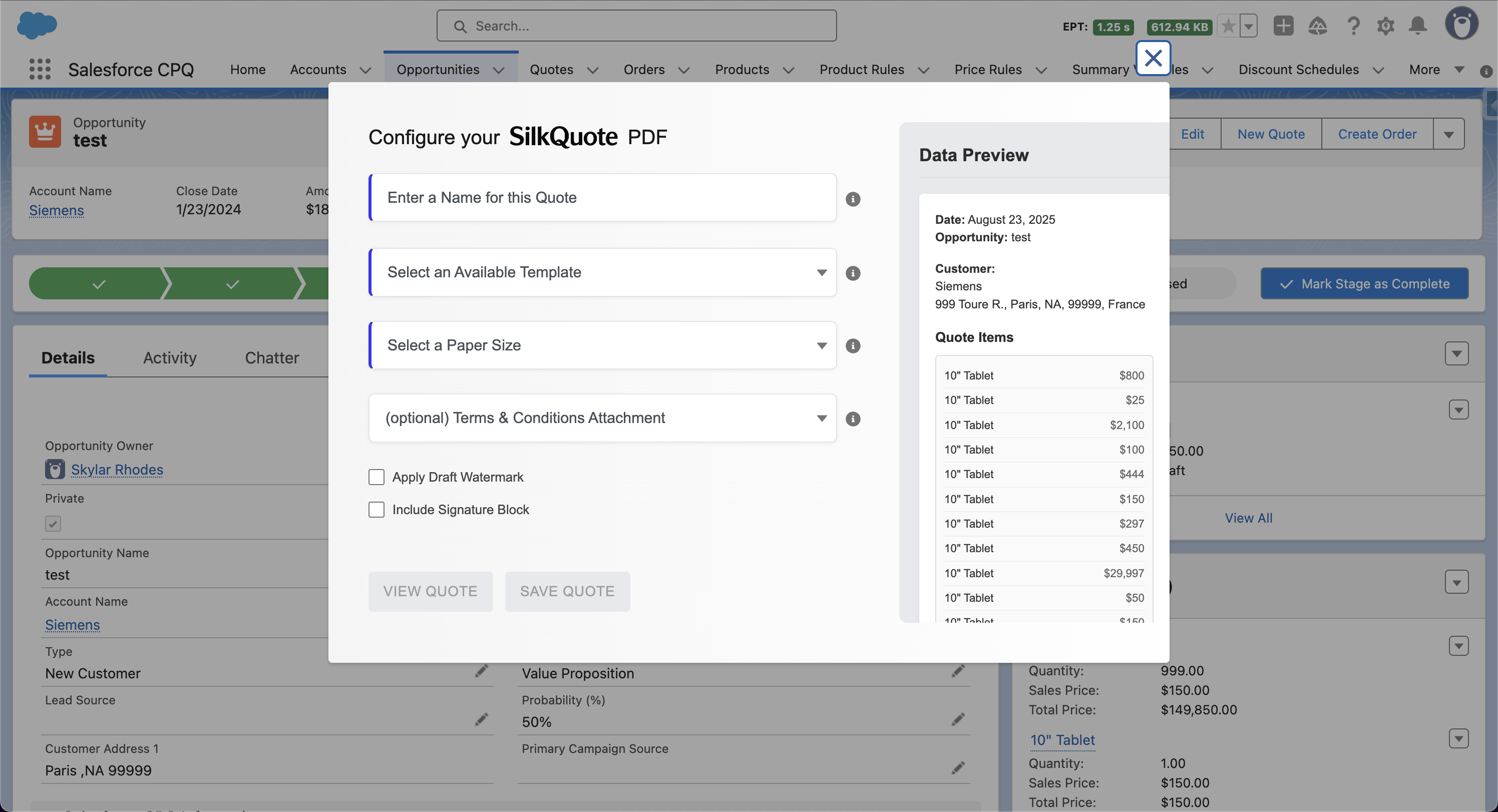
Quote Name— string label for the generated PDFDraft Watermark— boolean; enables the draft stamp on the documentTerms Id— specifies which Terms and Conditions document to attach
Outputs:
Content Document Id— the Salesforce ID of the generated PDFIs Success— boolean indicating the generation succeeded or failedError Message— string with error details if generation failed
The output values allow downstream Flow elements to act on the result. A Conditional element can check Is Success and branch to an error notification path if the generation fails. The Content Document Id can be passed to a Send Email action or used to create a custom record.
Workflow 1: Auto-Generate on Opportunity Stage Change
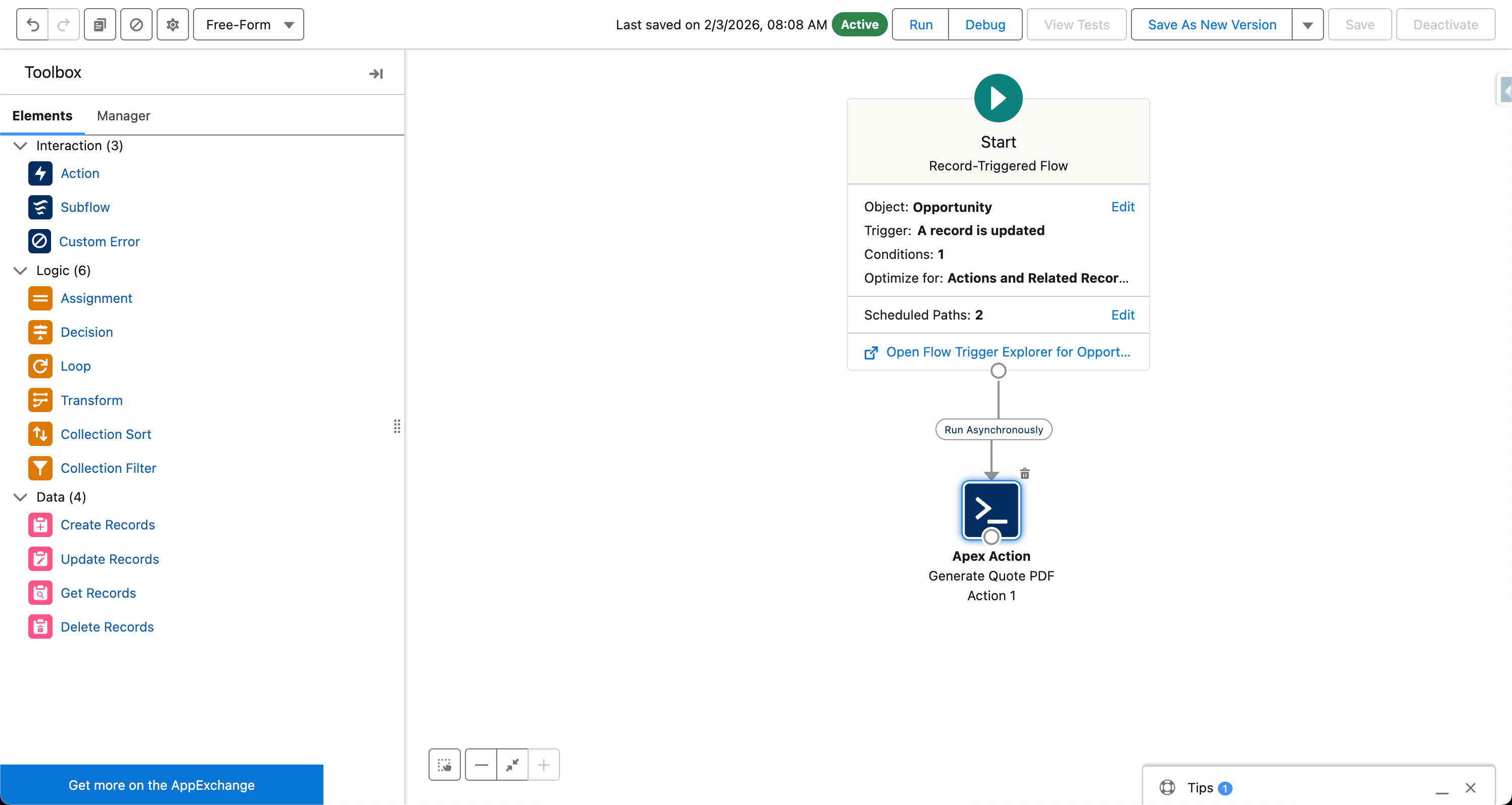
The most commonly implemented quote automation workflow generates a PDF automatically when an Opportunity reaches the Proposal stage. This removes the manual generation step from the rep’s workflow entirely.
Flow configuration:
- Flow type: Record-Triggered Flow on Opportunity
- Trigger: When a record is updated
- Entry condition:
Stage = Proposal SentANDPrior Value of Stage ≠ Proposal Sent(to prevent re-triggering on subsequent saves) - Action: SilkQuote invocable action
- Input:
Opportunity Id = {!$Record.Id} - Input:
Template Id = [your template's 18-char ID] - Input:
Quote Name = Proposal – {!$Record.Name}
- Input:
- Optional follow-up action: Create a Task on the Opportunity assigned to the Opportunity Owner with subject “Quote generated — ready to review”
Result: When any rep moves an Opportunity to the Proposal Sent stage, a PDF generates automatically and attaches to the Opportunity. The rep sees the generation notification and the new document in the Files section without having clicked Generate.
Variation for multiple templates: Add a Decision element before the Action element. The Decision evaluates Opportunity fields (deal size, record type, account region, product family) and routes to different SilkQuote invocable actions, each configured with a different template ID. This enforces correct template selection automatically.
Workflow 2: Approval-Gated Quote Delivery
Some organizations require manager or finance approval before a quote reaches the prospect. This workflow integrates quote generation with Salesforce’s native approval process. It generates a draft quote for the approval review and a clean final quote upon approval.
Phase 1: Draft generation (before approval):
- Flow trigger: Opportunity Stage changes to “Pending Approval”
- Action: SilkQuote invocable action with
Draft Watermark = true - Result: A draft-watermarked PDF attaches to the Opportunity as a reference document for the approver
Phase 2: Final generation (after approval):
- Approval process is submitted on the Opportunity
- Approval is granted by the assigned approver
- Approval process Final Approval Actions trigger a Flow (via the Process Builder or directly via Apex if needed for the approval action step)
- Flow action: SilkQuote invocable action with
Draft Watermark = false - Optional: Send Email action delivers the share link to the primary contact
Result: The approver reviews the deal with a draft quote visible. After approval, the clean final quote is generated and optionally delivered automatically. This reduces the delay between approval and prospect receipt.
For the full quote-to-close process in the context of approval workflows, see the Salesforce quote-to-cash comprehensive guide.
Workflow 3: Stale Quote Detection and Rep Alerts
Quotes become stale when the Opportunity data changes after a quote is generated. This happens frequently in negotiated deals: the rep adjusts pricing, updates line items, or revises the close date after the initial proposal is already in the prospect’s hands.
SilkQuote detects these changes and flags the affected quotes. A companion Flow can turn this detection into an active rep notification.
Flow configuration:
- Flow type: Record-Triggered Flow on Opportunity
- Trigger: When a record is updated
- Entry condition: A SilkQuote stale quote field is set to true (SilkQuote updates this field when it detects stale quotes)
- Action option A: Create a Task on the Opportunity assigned to the Opportunity Owner with subject “Quote is stale — regenerate before next contact”
- Action option B: Send an in-app Salesforce notification to the Opportunity Owner
- Action option C: Call the SilkQuote invocable action to automatically regenerate the quote with current data
For teams that prefer automatic regeneration over rep alerts, option C produces a fresh PDF immediately when stale detection fires. For teams where rep review before resending is important, option A or B surfaces the issue to the rep without taking action automatically.
Version management: Regardless of which option is used, the original quote and any regenerated versions are preserved as Content Documents on the Opportunity. The history is complete.
Workflow 4: Prospect Acceptance Triggers Next Steps
Prospect acceptance is a high-signal event. When a prospect clicks Accept on a hosted SilkQuote quote, the deal has progressed meaningfully and the next actions should happen quickly.
SilkQuote logs prospect acceptance as an activity on the Opportunity and updates a field on the Opportunity record to reflect the acceptance status. A record-triggered Flow can fire on this field update and automate the post-acceptance sequence.
Example post-acceptance workflow:
- Flow trigger: Opportunity
Quote Acceptedfield changes to true - Decision element: Evaluate whether a Salesforce Contract record should be created automatically (based on Opportunity type or record type)
- Action (if contract): Create a Contract record linked to the Opportunity Account
- Action (always): Update Opportunity Stage to “Closed Won” or a custom post-acceptance stage
- Action (always): Create a Task assigned to the Opportunity Owner with subject “Quote accepted — initiate onboarding”
- Action (always): Send an email notification to the account executive and the sales manager confirming the acceptance
This workflow compresses what is often a multi-hour manual sequence into an instant automated response. The rep sees the acceptance notification and finds the downstream actions already in motion.
Decline handling: A parallel workflow can handle quote declines. When Quote Declined is set, the Flow can notify the rep, schedule a follow-up task, and optionally trigger a re-engagement email sequence.
Activity Logging: How Every Quote Event Surfaces in Salesforce
Every interaction with a SilkQuote quote creates a logged activity on the Opportunity. This logging is automatic. No Flow configuration is required to capture the events.
Events that log automatically:
- Quote generated (timestamp, template name, quote name)
- Quote email sent (if shared through SilkQuote’s sharing feature)
- Email opened by prospect (timestamp)
- Quote viewed by prospect (timestamp, view count)
- Quote accepted (timestamp, prospect name)
- Quote declined (timestamp, prospect name)
These events appear in the Opportunity’s Activity Timeline alongside standard Salesforce activities (calls, tasks, emails). Managers reviewing an Opportunity can see the complete quote history without navigating to a separate report or system.
Reporting on quote events: Because quote events are logged as Salesforce Activity records, they are reportable through standard Salesforce Reports and Dashboards. Build reports that show average time from quote generation to prospect view, acceptance rates by template, or quote activity by rep. These use the same reporting tools your team already uses.
For analysis of broader quoting patterns across your pipeline, the Salesforce quote generator overview covers the tracking and version history features in detail. For the Salesforce PDF quote generation workflow including how files attach and are managed on the Opportunity record, see that dedicated guide.
Build Your First Quote Automation Workflow in Salesforce
SilkQuote’s Flow invocable action connects quote generation to the rest of your Salesforce automation stack. Stage-triggered generation, approval-gated delivery, stale quote alerts, and post-acceptance automation are all buildable with standard Salesforce Flow. No code required.
Install SilkQuote from the AppExchange and configure your first automated quote workflow today.
Frequently Asked Questions
Can SilkQuote trigger quote generation from a record-triggered Flow?
Yes. SilkQuote exposes a Flow invocable action that can be called from any Salesforce Flow type, including record-triggered Flows. The action accepts the Opportunity ID, template ID, and optional parameters, then generates the PDF and attaches it to the Opportunity automatically.
How does prospect acceptance feed back into Salesforce?
When a prospect accepts or declines a quote through SilkQuote's hosted share link, the event is logged as an activity record on the Opportunity. Acceptance events can also trigger downstream Salesforce Flows, allowing you to automate next steps like stage updates, task creation, or contract generation.
Does SilkQuote log quote events as Salesforce activity records?
Yes. SilkQuote logs all quote-related events as activity records on the Opportunity: quote generated, quote shared, email opened, quote viewed, quote accepted, and quote declined. These events appear in the Opportunity's activity timeline and are available for reporting.
Can I send automated follow-ups when a quote goes stale?
Yes. SilkQuote's stale quote detection identifies PDFs that are outdated due to Opportunity data changes. A Salesforce Flow can be triggered by the stale quote condition to send a rep notification, update a task, or automatically regenerate the quote with the current data.