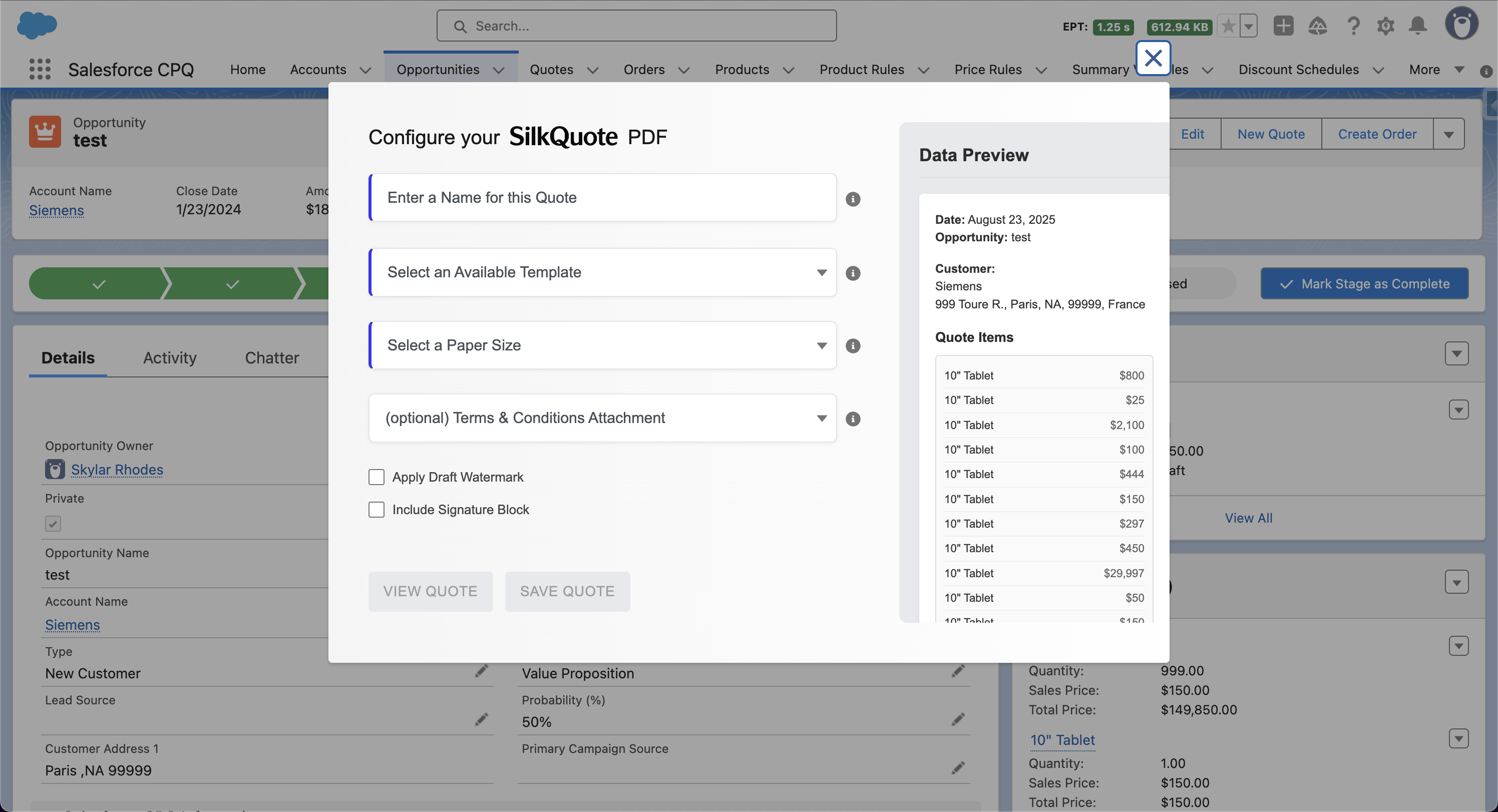
Manual quote generation works for teams with low quote volume or highly variable deal structures where each quote requires rep judgment. For teams with higher volume, predictable deal structures, or processes where speed to quote matters, automation changes the equation entirely.
SilkQuote’s Flow invocable action makes automated quote generation available to any Salesforce admin who can build a Flow. When a rep moves an Opportunity to the Proposal stage, the Flow detects the change, calls SilkQuote, and generates the appropriate PDF. The rep never needs to click the Generate Quote button. The document attaches to the Opportunity and is ready to review or share.
This page covers the case for automation, how SilkQuote’s invocable action works, the most common automated quoting patterns, and how to decide when to automate versus keep manual control.
The Case for Automated Quote Generation in Salesforce
The business case for automating quote generation rests on three factors: volume, consistency, and speed.
Volume. Teams that generate hundreds of quotes per month spend disproportionate rep time on manual generation steps. Each generation takes minutes individually but compounds at scale. Automating generation for routine deal types recovers that time for higher-value activities.
Consistency. Manual generation introduces variation. Different reps select different templates, include different terms, and make different formatting decisions. Automation enforces the correct template and terms for each deal type without relying on rep memory or judgment.
Speed. In competitive deals, the first vendor to deliver a clear, professional quote has an advantage. Automation eliminates the lag between a rep reaching the Proposal stage and the quote hitting the prospect’s inbox. In stage-triggered workflows, the quote can be generated and emailed before the rep has even refreshed their screen.
These benefits compound for inside sales teams, high-velocity B2B operations, and any organization where quote generation is a repetitive process rather than a bespoke event.
For the broader context on quoting automation, see the existing guide on automating your Salesforce quoting process. For specific Flow configuration tutorials, see the Salesforce Flow tutorial for quote automation.
How SilkQuote’s Flow Invocable Action Works
SilkQuote’s invocable action is a named callable action that Salesforce Flow can invoke as a step in any Flow type. When called, the action accepts input parameters that specify which Opportunity to generate the quote for and which template to use. It then executes the same quote generation logic that runs when a rep clicks the Quick Action.
Input parameters the action accepts:
- Opportunity ID (required) — the record to generate the quote from
- Template ID (required) — which SilkQuote template to use
- Quote Name (optional) — a string label for the generated PDF; defaults to a timestamp-based name if not provided
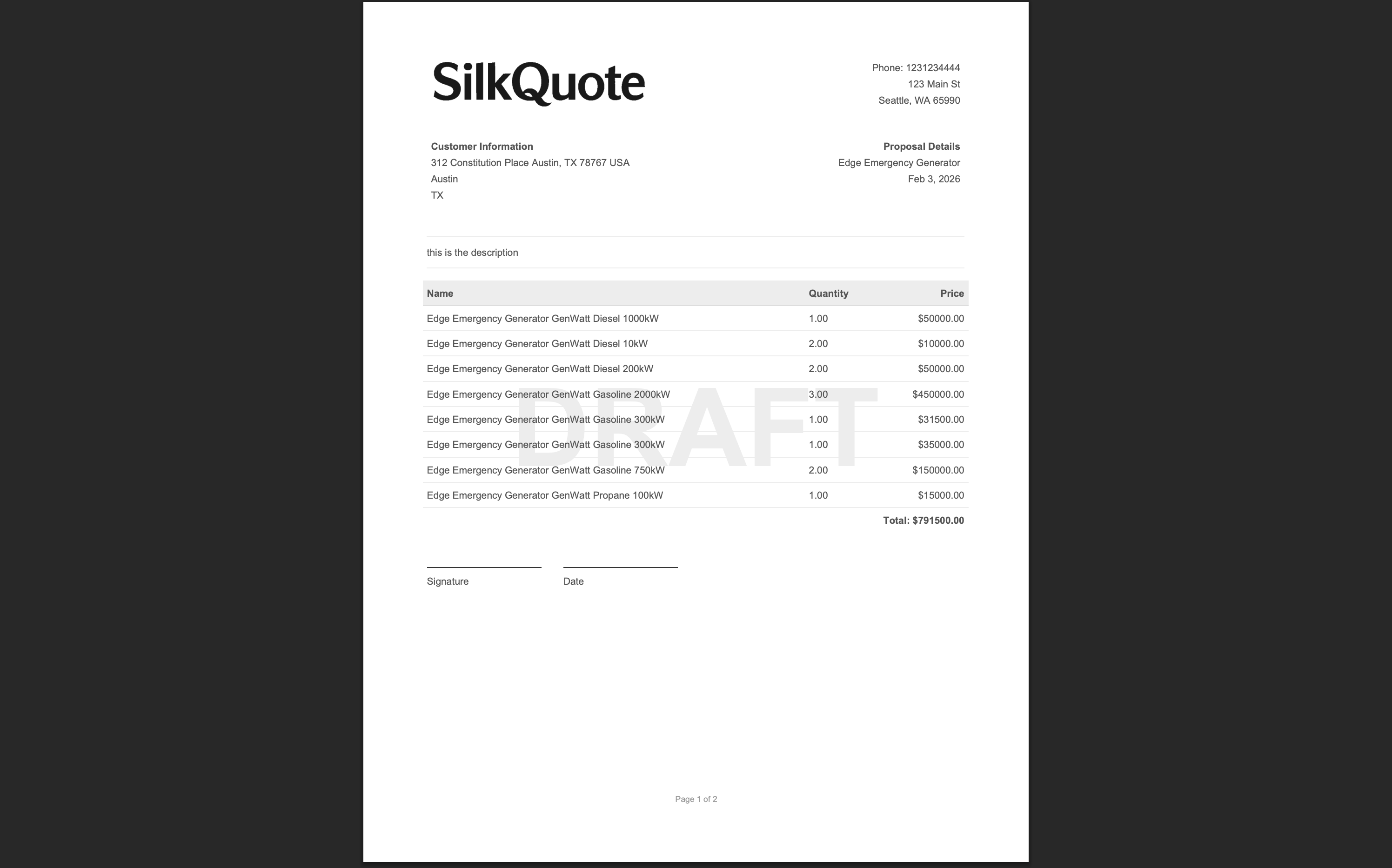
- Include Draft Watermark (optional) — boolean; if true, the PDF includes a diagonal draft watermark
- Terms ID (optional) — the ID of a specific Terms document to attach
Output parameters the action returns:
- Content Document ID — the Salesforce ID of the generated PDF file
- Success flag — boolean indicating whether the generation succeeded
- Error message — string with error details if the generation failed
The output parameters allow downstream Flow elements to use the generated file. A Flow can use the Content Document ID to create a ContentDocumentLink, send the file via email, or log the generation event as an activity.
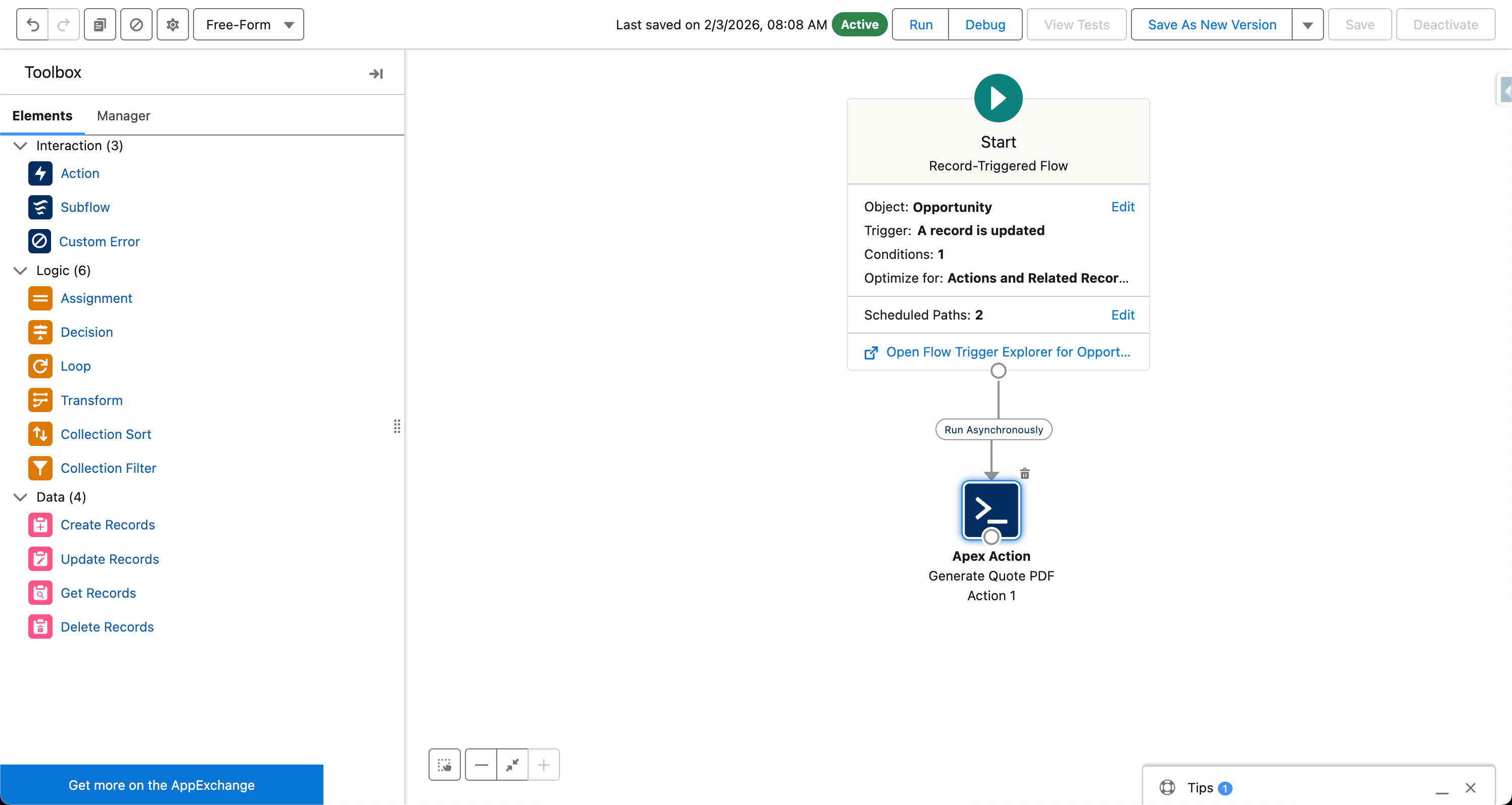
Where to find the invocable action: In the Flow Builder, add an Action element. Search for “SilkQuote” in the action search. The invocable action appears in the list and can be dragged into the Flow canvas like any other action step.
Trigger-Based Quote Creation: Stage Changes, Criteria, and Schedules
The most common trigger for automated quote generation is an Opportunity stage change. This is straightforward to configure in a record-triggered Flow.
Pattern: Generate on stage change
- Create a record-triggered Flow on the Opportunity object
- Set the trigger to “A record is updated”
- Add an entry condition:
Stage equals Proposal SentANDStage was changed - Add an Action element: Call the SilkQuote invocable action
- Pass the Opportunity ID (
{!$Record.Id}) and the appropriate Template ID as inputs - Save and activate the Flow
When any rep updates an Opportunity’s Stage to “Proposal Sent,” the Flow fires and SilkQuote generates the PDF automatically. The rep does not need to navigate to the Generate Quote button.
Pattern: Criteria-based template selection
For organizations with multiple templates (different templates for different regions, products, or deal types), a Decision element in the Flow can route to different SilkQuote invocable action calls based on Opportunity field values.
Example: An Opportunity with Account.BillingCountry = "United States" routes to the domestic template. An Opportunity with any other billing country routes to the international template. Two separate Action elements, each calling SilkQuote with a different Template ID, handle each route.
Pattern: Scheduled quote generation
Salesforce Scheduled Flows run at defined intervals. A scheduled Flow can query Opportunities that match specific criteria, such as Opportunities in the Proposal stage where no quote has been generated in the last seven days, and call SilkQuote’s invocable action for each one. This automates quote generation for deals that are overdue for a quote without requiring rep action.
For detailed Flow configuration walkthroughs with screenshots, see the Salesforce Flow automation tutorial.
Automated Delivery: Emailing Quotes Without Rep Action
Generation alone is one step. A fully automated quoting workflow also handles delivery. Salesforce Flow can chain quote generation with email delivery to produce a workflow where a stage change results in the prospect receiving the quote. The rep only needs to update the stage.
Pattern: Generate and deliver in one Flow
- Trigger: Opportunity Stage changes to “Proposal Sent”
- Action 1: Call SilkQuote invocable action → capture Content Document ID output
- Action 2: Get the SilkQuote share link for the generated document (available through SilkQuote’s Flow integration)
- Action 3: Use Salesforce’s “Send Email” action to email the primary Opportunity contact with the share link
- Action 4: Create an Activity record on the Opportunity logging the automated delivery event
This pattern requires that the Opportunity has a primary Contact with a valid email address. The email template used in the Send Email action can be a standard Salesforce email template, personalized with Opportunity and Contact merge fields.
Prospect engagement post-delivery. When the prospect clicks the share link and opens the hosted quote, that view event logs automatically on the Opportunity. When the prospect accepts or declines, those events also log and can trigger additional downstream Flows.
For a full workflow diagram covering automated generation, delivery, and acceptance handling, see the Salesforce quote automation workflows guide.
Version Control and Automated Stale Quote Detection
Automated generation solves the initial quote delivery step but introduces a version management question. If the Opportunity changes after the automated quote is generated, how does the team know the quote is stale?
SilkQuote’s stale quote detection handles this automatically. After a quote is generated, whether manually or via automation, SilkQuote monitors the Opportunity for relevant data changes. If line items change, pricing updates, or key Opportunity fields are modified, SilkQuote flags the previously generated PDFs as stale on the Opportunity record.
For automated workflows, this means:
- An automated quote generated when the Opportunity enters the Proposal stage is flagged as stale if the rep then updates pricing during negotiation
- The rep sees the stale indicator on the Opportunity and knows to regenerate before the next prospect interaction
- The Flow can optionally include a step that generates a replacement quote automatically when a stale condition is triggered
Version history is preserved throughout. All generated quotes, including the original auto-generated version and any subsequent regenerations, remain as Content Documents on the Opportunity with timestamps. There is a complete audit trail of what was sent and when.
Combining Automation With Approval Workflows
Many sales organizations require manager approval before a quote can be sent to a prospect, particularly for deals involving discounts above a threshold or deals with non-standard terms. SilkQuote is compatible with Salesforce’s native approval processes.
Pattern: Approval-gated quote generation
A common pattern is to generate a preliminary “draft” quote automatically when the Opportunity enters the Proposal stage, then generate a final approved quote when the approval process completes.
- Stage changes to “Proposal” → Flow generates a draft quote (with Draft watermark enabled) and attaches it to the Opportunity
- Rep submits the Opportunity for approval
- Approval outcome: Approved → a second Flow step calls SilkQuote to generate the final quote (no watermark) and attaches it to the record
- Rep receives a notification with the final approved quote ready to share
This pattern gives the approver the draft quote as a reference during the approval review, and generates the clean final document only after approval is granted.
Pattern: Approval-triggered delivery
Instead of generating on stage change, generate only after approval is granted. The approval process’s Approval Step Actions can trigger a Flow via an invocable action, which then calls SilkQuote to generate the PDF and sends it to the prospect immediately.
When to Keep Manual Control vs. Full Automation
Automation is not the right choice for every quoting scenario. The decision framework:
Automate when:
- Quote structure is predictable based on the deal type (the correct template can be selected by a Flow decision element without rep judgment)
- Quote generation timing should be consistent and not dependent on rep memory (stage-triggered)
- Volume is high enough that manual generation is a meaningful time burden
- Delivery speed is a competitive differentiator
Keep manual control when:
- Quotes require significant rep customization for each deal (selecting the right template requires judgment the Flow cannot replicate)
- Deal terms are frequently negotiated and multiple quote versions are expected before agreement
- Rep review before delivery is non-negotiable (preview mode and manual save is more appropriate)
- Automation adds complexity that the team’s current admin capability cannot maintain
Many organizations start with manual generation and add automation selectively. They automate the initial proposal generation while keeping regeneration manual during negotiation, for example. SilkQuote supports both patterns simultaneously: the same template can be used by manual generation (Quick Action) and automated generation (Flow invocable action).
For more on building automation patterns in Salesforce, including how quote tracking integrates with the broader sales workflow, see the Salesforce quoting tool overview and the Salesforce PDF quote generation guide.
Automate Quote Generation from Salesforce Opportunities
SilkQuote’s Flow invocable action gives Salesforce admins a clean, configurable entry point for automated quote generation. No custom Apex, no external integrations, and no rep intervention required when the workflow is configured.
Install SilkQuote from the AppExchange and configure your first automated quoting workflow today.
Frequently Asked Questions
Can SilkQuote generate quotes automatically without a rep clicking a button?
Yes. SilkQuote includes a Flow invocable action that allows Salesforce Flows to trigger quote generation automatically. The action can be called from record-triggered Flows, scheduled Flows, and screen Flows — without any rep interaction.
What triggers can I use to automate quote generation in Salesforce Flow?
Any trigger that can start a Salesforce Flow can trigger SilkQuote quote generation. Common triggers include Opportunity stage changes, field value changes, record creation, and scheduled time-based criteria. The Flow determines when generation happens; SilkQuote handles the generation itself.
Does automated quote generation work on record-triggered Flows?
Yes. SilkQuote's invocable action works in record-triggered Flows, which run automatically when Salesforce records are created or updated. For example, a Flow can trigger when the Opportunity Stage field changes to 'Proposal Sent,' call SilkQuote's action to generate the appropriate PDF, and attach it to the Opportunity — all automatically.
Can I automate quote delivery to the prospect after generation?
Yes. A Salesforce Flow can chain together multiple actions: call SilkQuote's invocable action to generate the PDF, then use Salesforce's Send Email action to email the prospect the quote link. This creates a fully automated quote-and-deliver workflow triggered by a single stage change.