Manual quoting is one of the most consistent sources of friction in a sales process. Reps pull data from the CRM, open a template, populate fields by hand, format the document, and either email it or attach it back to the deal record. Each step is an opportunity for error, inconsistency, or delay. Automated quotes eliminate this entirely.
This page covers what quote automation is, how it works, what it requires to implement, and how to evaluate whether your current quoting process is a candidate for automation.
What Automated Quotes Actually Mean
An automated quote is a quote document generated by the system rather than by a person. The quote tool reads deal data from the CRM — products, pricing, customer information, terms — and produces a formatted, branded document without any manual assembly.
The term covers a spectrum of automation:
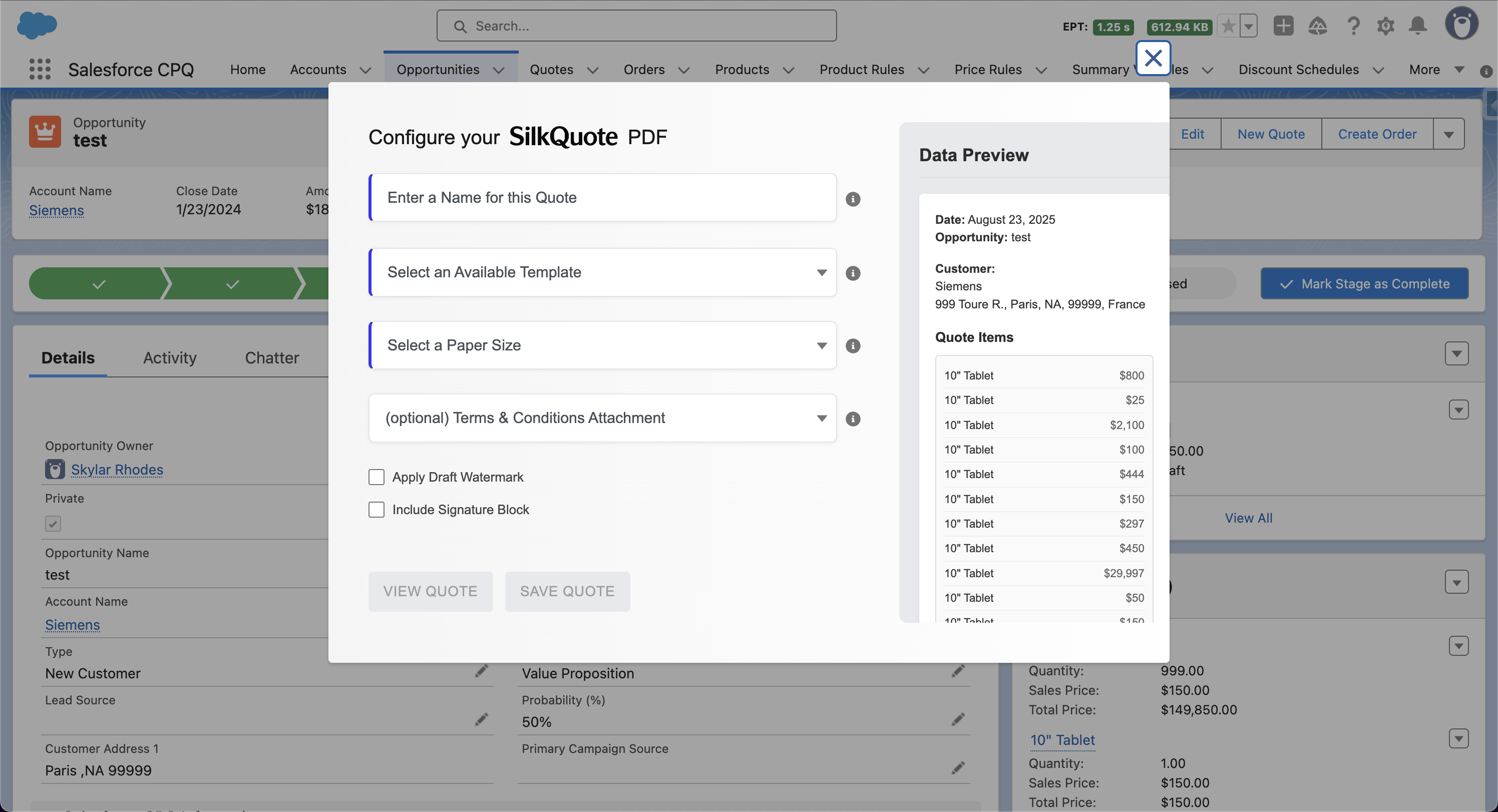
Semi-automated: A rep clicks a button on an Opportunity record. The system generates the quote PDF automatically from the record data and attaches it. The rep still initiates the action, but the document assembly is fully automated.
Fully automated: A system event — an Opportunity stage change, a field update, an approval completion — triggers quote generation without any rep action. The document is produced and attached (or sent) automatically based on the trigger conditions.
Both approaches eliminate the manual work of template population and formatting. The difference is whether a human initiates the generation step.
Why Manual Quoting Breaks Down at Scale
Manual quoting introduces problems that compound as deal volume grows:
Data errors. When reps manually copy pricing from the CRM into a quote template, transcription errors occur. A misplaced decimal or a copied subtotal from the wrong version of a product line creates a quote that does not match what was agreed in the CRM.
Inconsistent branding and formatting. Reps maintaining their own template files diverge over time. Logos get outdated, terms sections fall out of date, column formatting varies between team members. The quote that reaches the prospect no longer reflects the company’s brand consistently.
Version control problems. Manually maintained quote files accumulate across email threads, shared drives, and Opportunity attachments with inconsistent naming. Identifying which document is the current version becomes a support burden during deal review and legal review.
Delayed quote delivery. Reps in back-to-back meetings cannot generate quotes until they return to their desk. Automated generation triggered by stage change means the quote is ready immediately — before the rep is available to produce it manually.
Audit and compliance gaps. Manual quote generation is invisible to the CRM audit trail. Automated generation logs the event, the document version, and the trigger conditions, providing a complete record.
What Quote Automation Requires
Automating quotes requires three things:
1. A source of truth for deal data. Quote automation reads from the CRM. Product, pricing, customer, and deal data must be accurate and up to date in the source system. If reps maintain a separate spreadsheet for pricing negotiations, automated quotes will reflect the CRM data, not the negotiated pricing. The prerequisite for automation is clean CRM data.
2. A quote template that maps to the data structure. The quote tool needs a template that maps fields from the CRM to positions in the document. A well-designed template handles conditional sections (e.g., show terms only for certain deal types), grouped line items, and calculated fields like subtotals and discounts.
3. A trigger or workflow that initiates generation. For semi-automated quoting, the trigger is a rep clicking a button. For full automation, the trigger is a CRM workflow — a Flow in Salesforce, a stage change condition, or an API call from an external system.
How Automated Quotes Work in Salesforce
In Salesforce, the most common automation approach uses Flow to trigger quote generation programmatically. The flow is:
- An Opportunity record meets a defined condition (stage = “Quote Sent”, approval completed, field updated)
- A Salesforce Flow fires based on the trigger
- The Flow calls an invocable action exposed by the quote tool (e.g., SilkQuote’s generate quote action)
- The quote tool reads Opportunity and product data, renders the template, and produces a PDF
- The PDF attaches to the Opportunity as a Content Document
- Optionally: a notification is sent to the rep, or the document is sent directly to the prospect
SilkQuote exposes an invocable action compatible with Salesforce Flow, enabling this pattern with no custom code. The full implementation guide is covered in Salesforce automated quote generation and Salesforce quote automation workflows.
Common Automation Triggers
The right trigger depends on the sales process. Common patterns:
| Trigger | Use Case |
|---|---|
| Opportunity stage = “Proposal/Price Quote” | Auto-generate quote when rep advances the deal to quoting stage |
| Opportunity stage = “Negotiation” | Regenerate quote when deal re-enters negotiation after changes |
| Custom field “Quote Requested” = true | Rep signals readiness without manually opening the quote tool |
| Approval process completion | Generate final quote after management approval of deal terms |
| Scheduled: nightly job | Regenerate quotes on open Opportunities where product data has changed |
Stale quote detection — flagging PDFs that were generated before a subsequent product or pricing change — is a related feature. SilkQuote marks generated PDFs as stale when the underlying Opportunity data has changed, ensuring reps always know whether the current PDF reflects the current deal.
Evaluating Your Current Quoting Process
Before automating, map the current manual steps:
- Where does the rep go to initiate quoting? (CRM, email, desktop file?)
- What data do they copy manually vs. pull from the CRM?
- How many version-related issues occur per month? (wrong PDF sent, outdated pricing)
- What is the average time between deal data being final and a quote reaching the prospect?
- How many quotes are generated per rep per week?
If the answers reveal significant manual work, inconsistency, or delay, automation is warranted. For most Salesforce sales teams, implementing automated quotes reduces quote generation time from 15-30 minutes per quote to under 2 minutes for semi-automated, and to zero active time for fully automated workflows.
Start Automating Your Quote Generation
SilkQuote is a free, native Salesforce quoting tool built for automated quote generation. It integrates with Salesforce Flow, generates branded PDFs from Opportunity data, and attaches documents to the record automatically.
Install SilkQuote from the AppExchange and eliminate manual quoting from your sales process.
Frequently Asked Questions
What are automated quotes?
Automated quotes are quote documents generated programmatically from CRM or deal data, without manual copying, formatting, or file assembly. The system reads product, pricing, and customer information from the source record and produces a formatted document automatically.
How do you automate quote generation in Salesforce?
In Salesforce, quote automation typically involves a Flow or trigger that invokes a quote generation action when an Opportunity reaches a specific stage or meets defined criteria. Tools like SilkQuote expose an invocable action that can be called from Flow, allowing fully automated PDF generation and attachment without rep involvement.
What is the difference between automated quotes and manual quoting?
Manual quoting requires a rep to open a template, copy data from the CRM, format the document, save it, and attach or send it. Automated quoting removes all those steps — the system generates the document from live CRM data at the right moment, with no rep action required.
Can automated quotes be triggered without rep action?
Yes. With Salesforce Flow and a quoting tool that exposes automation endpoints, quotes can be generated automatically when an Opportunity stage changes, a field is updated, or an approval is completed — without the rep clicking anything.
Does automated quoting work for small sales teams?
Automated quoting is valuable for any team size. Small teams benefit from the time savings and consistency. Larger teams benefit from enforcement of consistent branding, terms, and data accuracy across hundreds of deals. The setup effort is modest relative to the ongoing time savings.